1One computer per agent
An agent that uses a browser or a desktop app needs a screen of its own. Several agents on my own Mac would fight over one mouse and reach everything I am logged into. A full virtual machine each keeps them apart, but booted from scratch, one of these desktops held 1.2 to 1.5 GB in my tests, so a laptop fits only a few. Hosted sandboxes solve it by the hour.
I wanted many desktops on the laptop I already have, sealed off from it, that any agent could drive, and one page where I could watch them all and step in when one gets stuck or reaches a payment.
2How it works
Desktops. Each desktop is a smolvm microVM [1] running Debian with Xvfb, openbox and Firefox at 1280x800, on Apple's Hypervisor.framework on a Mac or KVM on Linux. Nothing needs sudo or a daemon. adf init downloads a prebuilt image once, boots it as the template and keeps it running.
Copies, not boots. adf create copies the running template without stopping it. The copy shares the template's memory until it writes to it, so it is ready in about a second and an idle one holds 200 to 450 MB.
Tools for agents. adf mcp serves 15 tools over MCP [2] to create, start, pause and delete desktops, check how much room is left, and use a desktop: screenshot, click, move, drag, scroll, type, press keys or run a command. Every action returns a screenshot of the result. A skill teaches the agent to check the room first, split a task across desktops, hand the screen to a person for logins and payments, and delete its desktops afterwards. Claude Code gets both as a plugin, and adf skill install copies the skill into Codex, Cursor, Gemini CLI and other agents it finds.
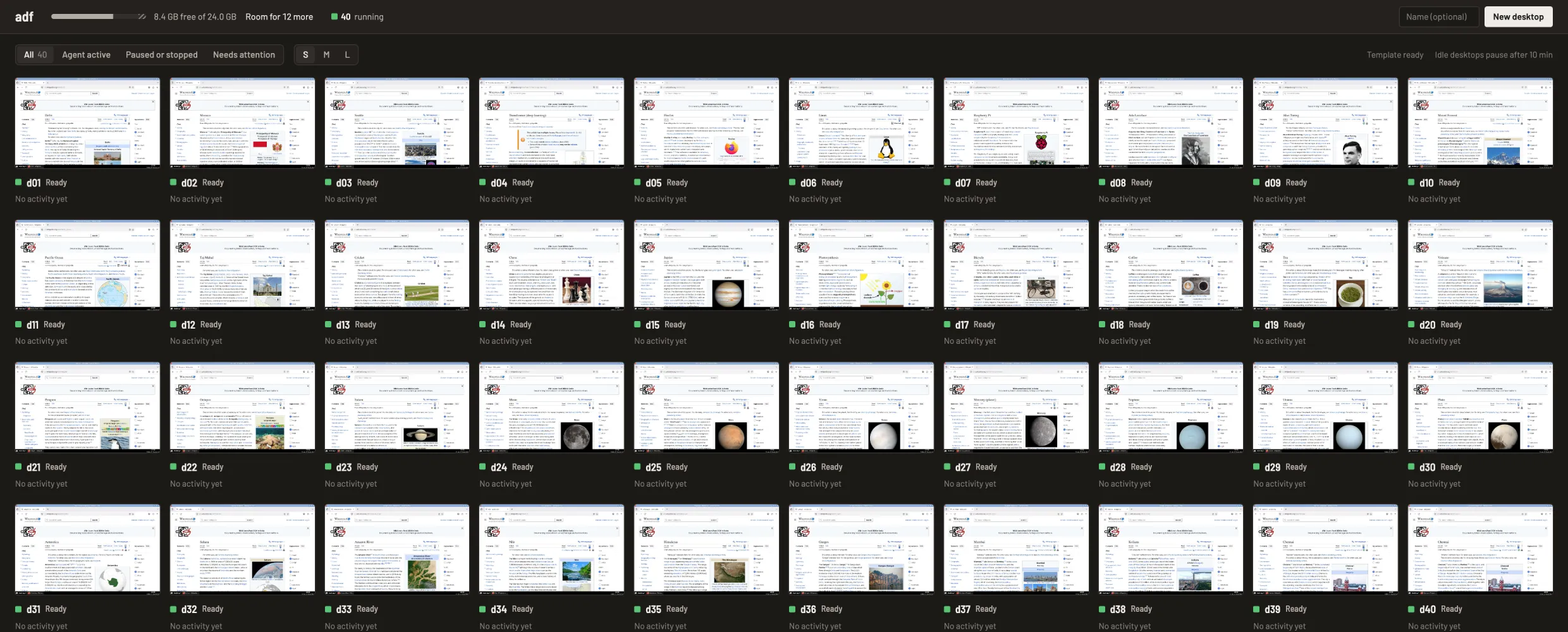
The console. adf console opens a local page with every desktop live, its CPU and memory, and the last thing an agent did on it. A desktop's border turns amber while an agent acts. Click one to watch it closely, or press Take control to use it with your own mouse and keyboard.
Room. Before it creates or wakes a desktop, adf checks free memory and refuses, with advice, when the computer would be left with less than 2 GB. A desktop idle for 10 minutes is paused: it costs no CPU or memory, and the next action resumes it in 2 to 3 seconds with its windows as they were.
3Choosing the runtime
I compared two microVM runtimes built on libkrun, smolvm and microsandbox, with the same desktop on the same Mac. microsandbox booted a bare machine faster, and its idle copies held a little less memory, 195 to 210 MB against 241 to 247 MB. But installing the desktop took it 95 seconds against 20, and smolvm can copy a running machine without pausing it. I picked smolvm, behind a small interface so another runtime can be added later.
One plan did not survive. smolvm can show a machine's screen from the host, which would have kept capture software out of the desktops. But a copy of a running machine never sends a single frame, on macOS or Linux, so I reported it upstream [3]. Screenshots and input now go through scrot and xdotool inside each desktop, which works with copies today.
4How many fit
To find out, I created desktops five at a time, up to 40, and in each one typed the address of a different Wikipedia article, the way an agent would. My usual apps stayed open, and at the start the Mac had 15.1 GB free.
| Desktops | Memory free | Held by the desktops |
|---|---|---|
| 0 | 15.1 GB | 0 GB |
| 10 | 13.0 GB | 4.0 GB |
| 20 | 10.6 GB | 7.9 GB |
| 30 | 8.2 GB | 11.9 GB |
| 40 | 8.4 GB | 15.8 GB |
Table 1. MacBook Pro, M5, 24 GB, macOS 27. Memory free is what adf reported. Held by the desktops is the private memory of every desktop's VM process added up, compressed memory included.
adf refused none of them. At 40 it reported 8.4 GB free and room for 12 more. 39 of the 40 pages loaded on the first try. In the last desktop the typed address went missing, and typing it again worked in 0.6 seconds.
The desktops held about 390 MB each, 15.8 GB in all, yet free memory fell by only 6.7 GB. macOS compressed memory to make room, and after 30 desktops free memory stopped falling at all.
Memory was not the first wall. An idle desktop showing Firefox's empty new tab uses about 0.1% of a core, but with a Wikipedia article open, Firefox kept using about a tenth of one. So 40 desktops used about 4.4 of the 10 cores with no agent doing anything. Agents at work would run out of CPU before memory, which is why idle desktops pause on their own.
A new desktop was ready in 0.8 seconds at the median, and two took about 9. With all 40 running, a screenshot from the command line took 0.25 to 0.6 seconds. Deleting all 40 took 13 seconds, and free memory went back to 15.1 GB.
5Agents on it
I asked one Claude Code session to compare a long weekend in Seattle, San Diego and Las Vegas. It loaded the adf skill on its own, checked the room, and opened nine desktops at once, one each for the flights, hotels and things to do in each city. It came back with a comparison and a pick, then deleted all nine. The video on the repo page shows a run of it.
The repo also has a demo script with four Claude Code agents. Two test a demo shop made for test automation [4] under different accounts and report the bugs they find. One builds a table with a SUM formula and a chart in LibreOffice Calc. One buys a backpack but stops before the last button; a person presses Finish from the console, and the agent notices and confirms the order. In a test run the testers found 5 and 6 bugs, and each agent took 42 to 83 seconds, for $0.97 in all with Sonnet.
6What I take from it
Copy a running machine instead of booting one. A desktop booted from scratch held 1.2 to 1.5 GB. A copy of a running one holds 200 to 450 MB and is ready in under a second.
On a laptop, CPU runs out before memory. macOS stretches memory by compressing it, and an open web page keeps a browser busy. Pausing idle desktops matters more than squeezing memory.
Ship the computer, not the agent. adf does no thinking. MCP tools and a short skill were enough for Claude Code to plan its own split across nine desktops and clean up after itself.
7Limits
- The 40 desktops were a load test: a script opened the pages. The most agents I have run at once is nine.
- Measured on one Mac, an M5 with 24 GB, with my other apps open. How many fit depends on what else is running.
- On Linux, smolvm 1.37 cannot resume a paused desktop yet, so there pausing stops it: its files are kept and its windows close. The smolvm maintainers have marked my report fixed [5], and the fix is not in a release yet. I have tested Linux on one AWS machine with nested virtualization.
- Linux desktops only, with software rendering. No Windows or macOS desktops.
- A desktop keeps an agent away from your computer, not away from the websites and accounts you let it use.
- Early development. The binaries are not notarized.
References
- [1]smolvm, the microVM runtime adf builds on: github.com/smol-machines/smolvm
- [2]Model Context Protocol: modelcontextprotocol.io
- [3]smolvm issue 2475: a branched machine never sends host display frames. github.com/smol-machines/smolvm/issues/2475
- [4]Sauce Labs. Swag Labs, a demo shop made for test automation: saucedemo.com
- [5]smolvm issue 2477: on Linux, resuming a paused branch fails. github.com/smol-machines/smolvm/issues/2477
- [6]adf, code, install and docs: github.com/CodeGeek04/agent-desktop-fleet